A 16x2 character LCD can show you a set point. It cannot show you the trend line that explains why the set point drifted. A colour TFT can show anything — and will happily consume the battery budget, the BOM headroom, and the outdoor legibility you were counting on.
Between the character LCD and the colour TFT sits the dot matrix LCD display module: a monochrome grid of addressable pixels that draws waveforms, bar graphs, icons, and multilingual text while sipping microamps from a lithium cell.
For industrial hardware teams, this is rarely a cosmetic choice. The display decides how thick the enclosure can be, how long the field unit survives between battery changes, whether the operator can read a fault code in direct sunlight at −20 °C, and whether the product still has a supply chain in 2032.
This guide covers how a dot matrix module actually works, compares the three build architectures you will be quoted against (COB, COG, and TAB), walks through the specifications that determine readability, and closes with a specification checklist you can send to a supplier today.
Short version. A dot matrix LCD display module is a passive-matrix monochrome LCD with a controller IC that maps one RAM bit to one pixel. Choose COB for large, stationary, cost-sensitive instruments; COG for thin, battery-powered handhelds; TAB for fine-pitch, higher-resolution panels where the driver must sit on a flex tail. Then specify duty, bias, fluid, and viewing direction before you approve tooling — because those four parameters, not the resolution, decide whether the screen looks good in the field.
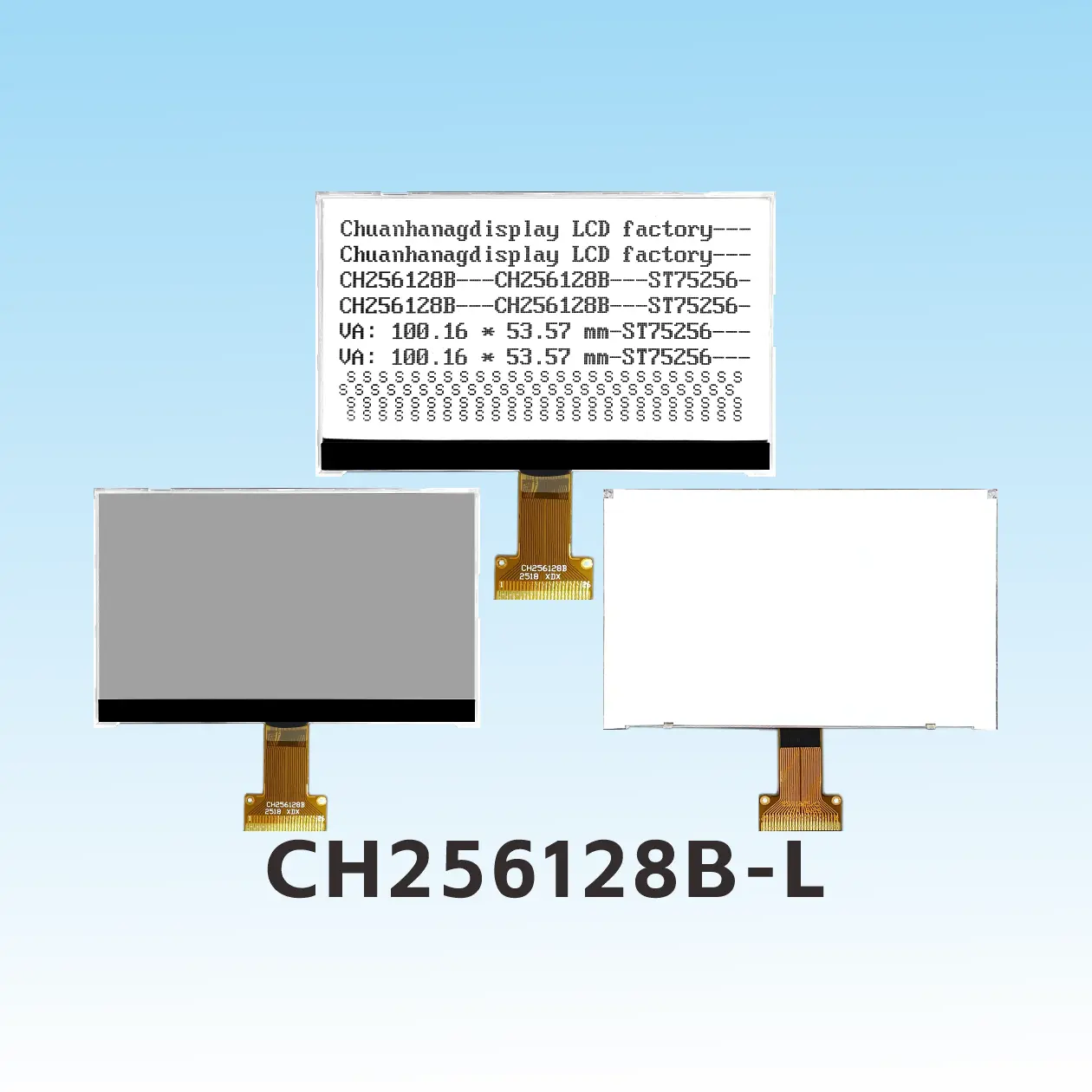
A dot matrix LCD is a liquid crystal cell whose front and back electrodes are patterned as perpendicular strips, producing a grid of intersections. Each intersection is one dot (pixel), and each dot can be switched on or off independently by the driver electronics. Group enough dots and you can render any shape the controller's RAM can hold: a 128x64 grid gives you 8,192 individually controlled pixels.
That is the difference between three display families that are often confused in RFQs:
| Type | What the glass contains | What you can display | Typical use |
|---|---|---|---|
| Segment LCD | Fixed shapes and 7-segment digits | Numbers, a handful of icons | Meters, thermostats, utility gauges |
| Character LCD | A fixed 5x8 dot cell per character position | ASCII from an on-chip font ROM | Menu lines, status text |
| Dot matrix (graphic) LCD | A continuous pixel grid, no fixed layout | Text in any font, graphs, waveforms, logos, CJK glyphs | Instruments, medical devices, industrial HMI |
A module — rather than a bare panel — adds the four blocks that make the glass usable by a microcontroller:
When engineers say a design "needs a graphic LCD module," they usually mean the third row of that table: they need a pixel grid, not a character grid, because the information is spatial — a trend, a waveform, a gauge sweep, a barcode, a Chinese label.
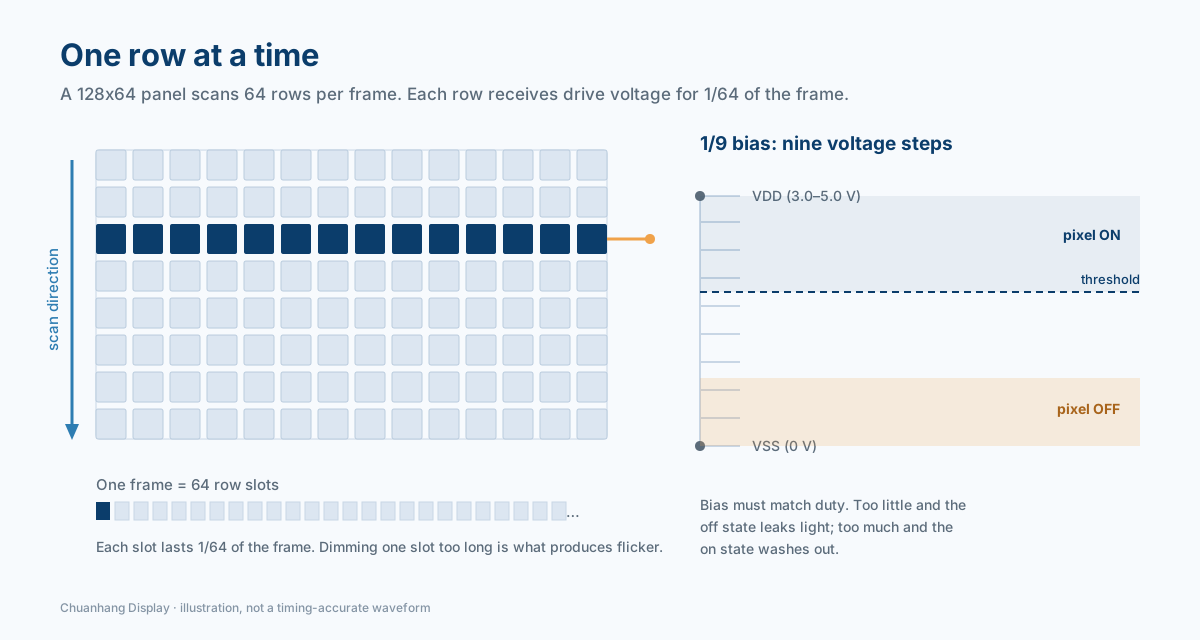
Every dot matrix LCD module is multiplexed. The controller cannot drive 8,192 pixels with 8,192 wires, so it scans one row at a time: it activates common row N, applies data voltages to every column in that row, holds the image for a slice of time, then moves to row N+1.
Two numbers describe this scheme, and both appear on every credible datasheet.
Duty is the reciprocal of the number of scanned rows. A 128x64 panel driven as 64 rows runs at 1/64 duty; each row is energised for 1/64 of the frame. A 320x240 panel runs at 1/240 duty. Higher duty means each pixel receives a smaller share of the drive waveform, which lowers contrast and makes crosstalk more visible.
Bias is the number of voltage levels the column driver produces, expressed as a ratio. A 1/9 bias driver generates nine steps between VSS and VDD so that on-pixels and off-pixels land on opposite sides of the liquid crystal's threshold. Bias must be matched to duty: too little bias and the off state leaks light; too much and the on state washes out.
Concrete examples from the Chuanhang catalogue show how tightly these are paired:
| Module | Resolution | Drive scheme | Controller |
|---|---|---|---|
| CH12864B | 128x64 | 1/64 duty, 1/9 bias | AIP31020 class |
| CH320240E-8 | 320x240 | 1/240 duty, 1/14 bias | RA8835 |
Three practical consequences follow.
Contrast is a system property, not a panel property. The optimum V0 (or the internal charge-pump setpoint) shifts with temperature because liquid crystal viscosity and threshold voltage both move. A module without temperature compensation will look pale in a +70 °C cabinet and ghost badly at −20 °C. Industrial modules solve this either with a controller that compensates internally or with an NTC thermistor network feeding the contrast pin — and the second option is cheaper, which is why so many instrument designs still use a trimmer plus a thermistor.
Crosstalk scales with duty. In a 1/240 multiplex, an "off" pixel still sees a fraction of the drive waveform from every other row. The result is faint vertical shading behind bold characters, or a grey wash across dense graphics. It is a design limitation of passive matrix, not a defective unit — which is why very high-resolution monochrome panels are usually quoted with FSTN fluid and a carefully matched bias.
Frame rate trades against flicker and power. Typical modules refresh at 60–100 Hz. Drop below roughly 50 Hz and the scan becomes visible as flicker, especially with a scrolling graph; push higher and you pay in current. If your firmware sleeps the controller between updates, confirm that the panel tolerates a static frame without image sticking.
The resolution tells you what the screen can show. The packaging tells you whether the screen fits in your product, survives your drop test, and costs what your BOM allows. This is the comparison most first-time buyers skip, and it is the one that usually forces a redesign.
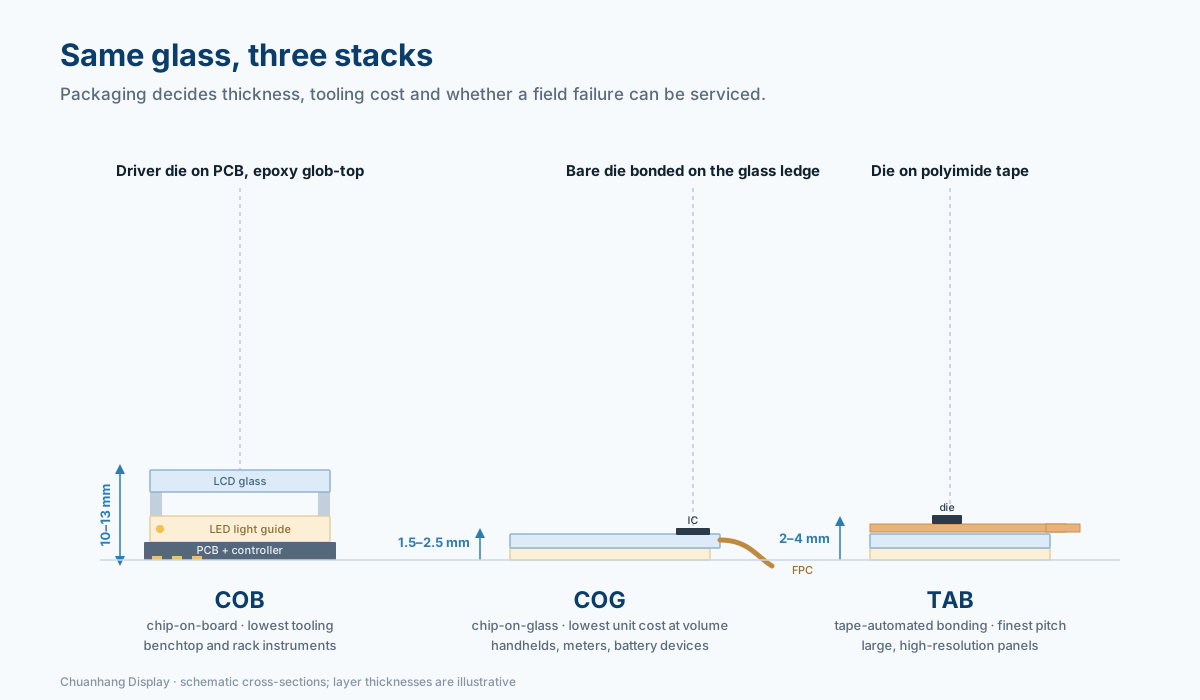
COB (Chip-on-Board). The controller die is die-attached and wire-bonded to a PCB, then encapsulated under a black epoxy blob. The glass sits above that board on a frame, connected by elastomer zebra strips or soldered pins. It is the oldest, most forgiving architecture: cheap tooling, easy handling, generous mechanical tolerances, and a board you can populate with your own connectors, ESD parts, and level shifters. The cost is depth — a COB module is typically 10–13 mm thick, plus clearance for the pins.
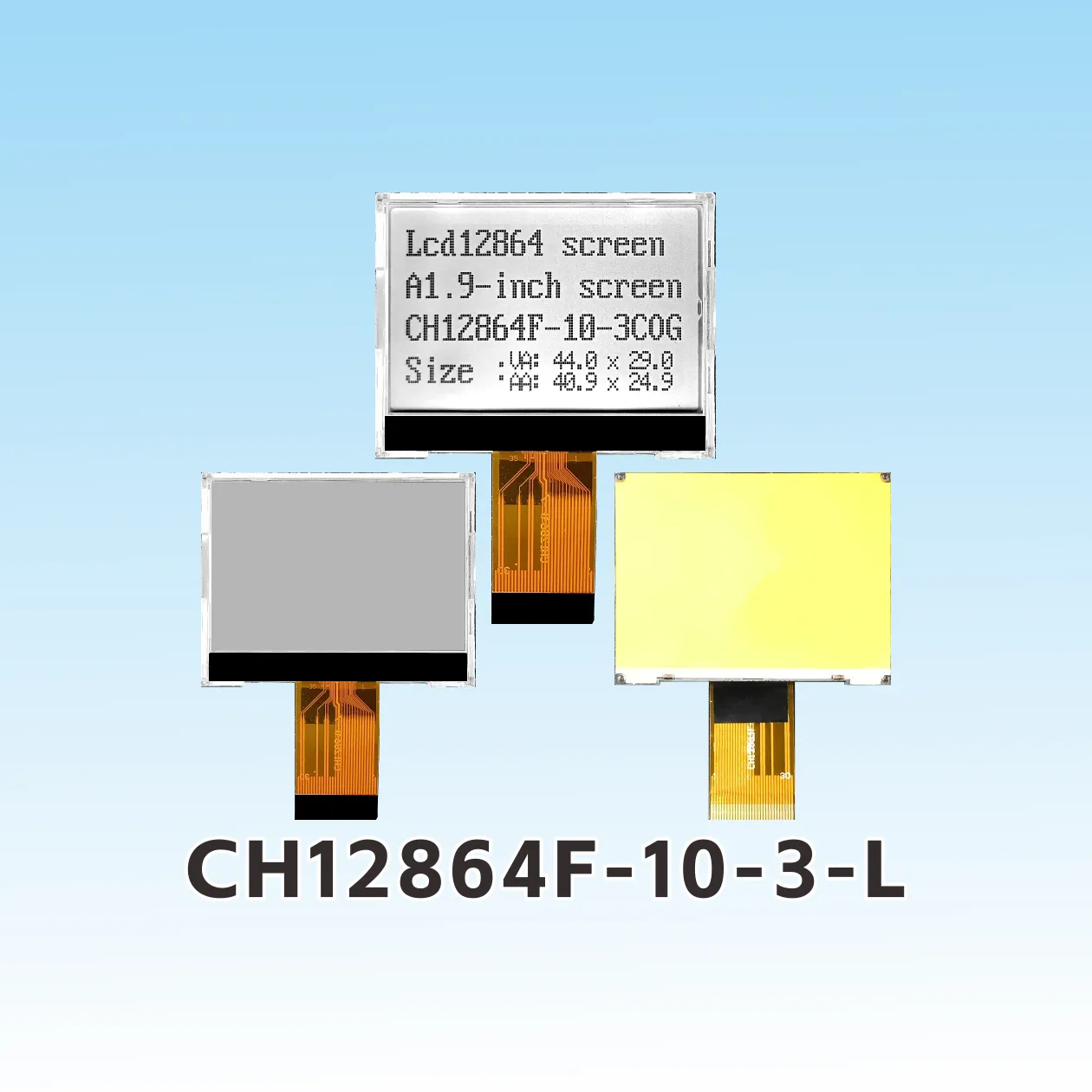
COG (Chip-on-Glass). The bare die is bonded directly onto the ITO ledge of the LCD glass using anisotropic conductive film, and a thin polyimide FPC carries power and signals out. Removing the carrier board collapses the stack: a COG module is often under 2.5 mm thick including backlight. Bonding is fully automated, so unit cost falls at volume, and the short ITO traces reduce parasitic capacitance — which measurably lowers drive current in battery equipment. The trade-off is that the glass ledge now carries exposed silicon: the enclosure must not press on it, and field repair is impossible.
TAB (Tape-Automated Bonding). The die is mounted on a polyimide tape with fine-pitch copper leads, and the tape is bonded to the glass. TAB handles finer pad pitch than COG on large panels, tolerates a flexible tail, and was the standard route for high-resolution monochrome and early colour panels. Tooling and material costs are higher, and the assembly is less common in small-format monochrome work today.
| Criterion | COB | COG | TAB |
|---|---|---|---|
| Driver location | PCB, epoxy glob-top | Bonded on LCD glass ledge | Bonded on polyimide tape |
| Typical module thickness | 10–13 mm | 1.5–2.5 mm | 2–4 mm |
| Tooling cost | Lowest | Low | Highest |
| Unit cost at volume | Moderate | Lowest | Highest |
| Mechanical robustness | Good; solder joints are the weak point | Excellent; solid-state bond, but glass is exposed | Good; flexible tail relieves stress |
| Field repairability | Connector and backlight replaceable | None — replace the module | None |
| Best fit | Benchtop instruments, rack equipment, 240x128 and 320x240 panels | Handhelds, meters, wearables, battery devices | Fine-pitch large panels, curved or tight enclosures |
Decision rules that hold up in practice:
One more packaging variable deserves equal weight: the interconnect. Pin headers survive hand assembly and field rework; zebra connectors are cheap but sensitive to bezel pressure; soldered FPC tails give the thinnest, most vibration-tolerant result but cannot be serviced. For anything that sees rail vibration or a drop spec, specify the FPC tail and add a strain-relief bend radius to the drawing.
Buyers often start from a resolution they have seen before — usually 128x64 — because it is the most common graphic LCD format in the world. It is worth checking whether it actually fits the information.
The usable rule is simple: characters per line = active width ÷ font cell width, and lines = active height ÷ font cell height. A 6x8 cell yields more characters but a cramped, thin font; an 8x16 cell is comfortable and is the minimum for legible CJK glyphs.
| Grid | Typical active area | Chars at 6x8 | Chars at 8x16 | Good for |
|---|---|---|---|---|
| 122x32 | ~60 x 18 mm | 20 x 4 | 15 x 2 | Two-line status, large digits |
| 128x64 | ~66 x 33 mm | 21 x 8 | 16 x 4 | The workhorse: menus, small waveforms |
| 160x160 | ~54 x 54 mm | 26 x 20 | 20 x 10 | Square gauge faces, icon dashboards |
| 240x160 | ~90 x 60 mm | 40 x 20 | 30 x 10 | Dense data tables, multi-language labels |
| 320x240 | ~115 x 86 mm | 53 x 30 | 40 x 15 | Full instrument screens, complex HMI |
Two physical numbers matter as much as the grid:
Dot size and dot pitch. The 2.9-inch 128x64 dot matrix LCD referenced above uses 0.48 mm dots in a 66.5 x 33.2 mm active area. The 5.7-inch 320x240 uses 0.408 mm dots across 115.2 x 86.4 mm. Smaller dots give a finer image but demand more contrast, because each pixel contributes less light. For a panel viewed at arm's length, a dot pitch around 0.4–0.5 mm is comfortable; below 0.3 mm, expect to need a backlight and a better fluid to keep the display readable.
Outline versus active area. The glass outline is always larger than the active area, and the bezel larger still. Allow 6–10 mm per side for the seal, the driver ledge, and the frame. Designs that fail mechanical fit almost always fail here — someone specified the active area and assumed the module would be that size.
A last sizing check: decide the density from your worst-case screen, not your average one. If one screen must show a 12-row alarm log plus a header and a footer, design for 14 rows of text, not 8.
Resolution determines what you can draw. The optical stack determines whether anyone can read it. Three choices stack on top of each other: the liquid crystal mode, the polarizer configuration, and the backlight.
Liquid crystal mode. Twisted nematic (TN) is the cheapest and has the narrowest viewing cone. STN increases the twist for higher multiplexability and sharper contrast. FSTN adds a compensation film that removes the characteristic blue and yellow tints, producing true black-on-white — the mode most industrial buyers mean when they ask for a "paper-like" display. VA (vertically aligned) delivers the deepest black and highest contrast, at a higher unit cost.
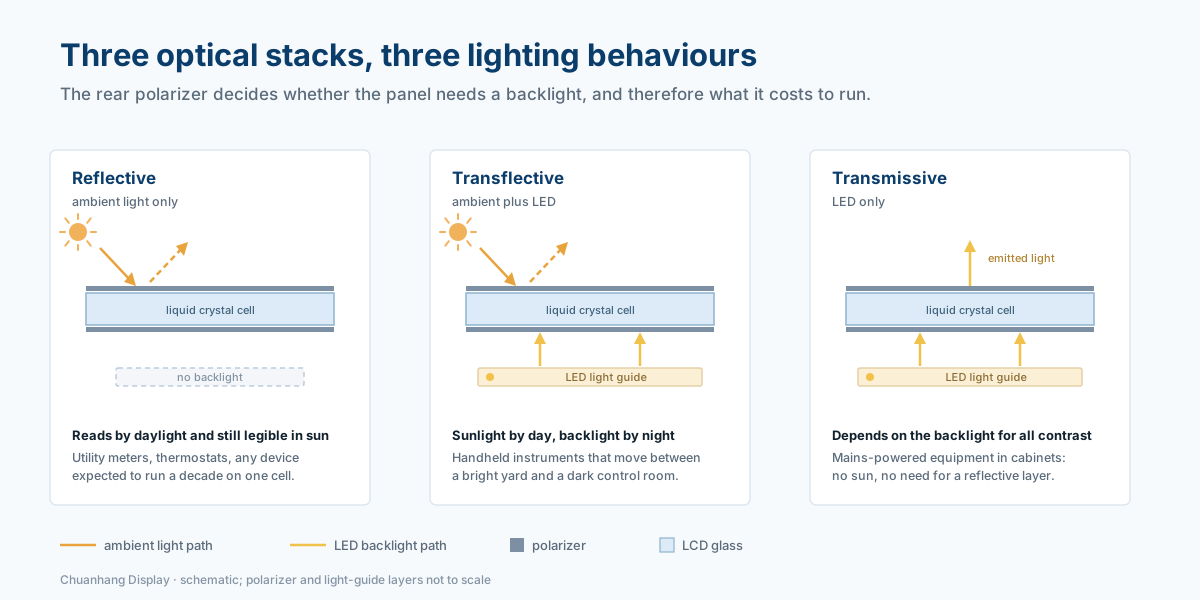
Polarizer configuration. Reflective panels use ambient light and need no backlight at all, which makes them ideal for utility meters and any device expected to run a decade on one cell. Transflective panels combine a reflective rear polarizer with a backlight: sunlight-readable outdoors, lit at night. Transmissive panels depend entirely on the backlight and are only appropriate for dark operating environments.
Backlight. A white LED edge-lit guide is standard. Expect roughly 60–120 mA at 5 V for a 128x64 panel with the backlight at full brightness — an order of magnitude above the panel's own logic current, which is why backlight duty cycling is the single largest power lever in a battery design. If night vision or low-light use matters, specify an amber or green LED, which preserves dark adaptation better than white.
| Requirement | Recommended stack |
|---|---|
| Outdoor meter, no battery maintenance for 10 years | Reflective FSTN, no backlight, wide-temperature fluid |
| Handheld instrument, indoor and outdoor | Transflective FSTN with white LED edge light |
| Dark control cabinet, mains powered | Transmissive STN with high-brightness backlight |
| Premium look, deep black background | VA with white LED backlight |
| Harsh sunlight, high contrast required | Reflective or transflective FSTN with anti-glare polarizer |
Do not overlook viewing direction. A module specified at 6 o'clock is optimised for a display viewed from below, which suits a benchtop instrument. Panel-mounted equipment viewed from above needs 12 o'clock. Getting this wrong produces a display that looks perfect on the bench and unreadable once the enclosure is mounted at eye level.
The hardware interface is the least interesting part of the datasheet and the most common source of schedule slip. Four options dominate monochrome graphic modules.
8-bit parallel (8080 or 6800 timing). Fast, tolerant of slow controllers, and the default on legacy COB modules — the CH12864B, for example, is specified with an 8-bit parallel port and 6800 timing. It costs 11–13 MCU pins including control lines, which is painful on a 32-pin microcontroller but irrelevant on an STM32 with spare GPIO.
4-wire SPI. The practical default for new designs. Four lines, clock rates up to 10 MHz, and enough throughput for a 128x64 panel at 30+ fps. The catch is that SPI controllers usually cannot read back the frame buffer, so your firmware must maintain a 1 KB shadow buffer for a 128x64 panel (8,192 pixels ÷ 8 bits) and push dirty pages rather than whole frames.
I2C. Two pins, slowest option, best reserved for segment-class or small 128x32 panels with infrequent updates. Budget the bus time honestly: a full 128x64 frame is 1,024 bytes, which is roughly 90 ms at 100 kHz before overhead.
Controller family matters more than the bus. Parts such as the ST7565/ST7567 and UC1701 are page-addressed: RAM is organised in 8-pixel-tall pages, and you write a byte to cover eight vertical pixels in one column. That layout is efficient for text but awkward for drawing lines and circles, so plan a small graphics library rather than hand-rolling pixel math. The ST7920 family is unusual in carrying a character ROM, which lets you print strings without a font table — convenient, but it limits you to the glyphs in ROM, and CJK support then depends on the specific part.
Controllers like the AIP31020 class used in the CH12864B have no font ROM at all. That is not a defect; it is a cost decision. You supply the font, which means you can pick any typeface, any character set, and any icon style — at the price of a few kilobytes of flash and a font renderer in firmware. For products shipping into multiple language markets, that flexibility is usually worth it.
Finally, treat the initialisation sequence as part of your BOM. Bias and duty settings, charge-pump configuration, RAM clear, and display-on commands must run in the right order at every power-up, including after a brownout. Modules that "work on the bench but boot white in the field" are nearly always missing a reset delay or a charge-pump settle time.
A dot matrix LCD display module that meets its datasheet on a lab bench can still fail in a coal mine, a substation, or an ambulance. The failure modes are predictable.
Temperature. Standard modules are rated −20 °C to +70 °C operating and −30 °C to +80 °C storage. Extended industrial fluid pushes operation to −30 °C to +80 °C. Below about −30 °C, most liquid crystals simply stop responding; no amount of firmware fixes a frozen panel, so if your product must cold-start at −40 °C, you need a heater film or a different technology. At the hot end, contrast droops and the polarizer can yellow over years of UV exposure.
Humidity and condensation. Condensation on the inside of the glass is a seal failure, not a display failure — but it looks identical in the field. Specify an IP-rated front window or a gasket, and avoid mounting the module against a cold metal chassis that acts as a condensing surface.
Vibration and shock. The glass is the fragile element, and the bezel is what protects it. Specify uniform bezel pressure around the perimeter, never on the driver ledge, and add a compliant gasket rather than metal-to-glass contact. For rail, mining, or vehicle mounting, prefer the soldered FPC tail over pin headers; a 20-pin header under vibration is 20 fatigue sites.
ESD. On COG modules the driver die sits exposed on the glass ledge. It is sealed under protective resin, but it is still the most ESD-sensitive point on the assembly. Design the enclosure so the ledge is covered and cannot be touched during handling, and keep the FPC ground plane continuous.
Image sticking. A static screen left on for weeks can leave a faint ghost, particularly in TN fluid at high contrast. If your UI has a permanently fixed header, shift it by one pixel periodically or reduce contrast slightly in long-idle states.
Connector and cable life. FPC tails are rated for a limited number of insertion cycles. If field service will unplug the display, specify a ZIF connector with a locking bar and document the cycle limit.
Colour TFTs have not displaced monochrome dot matrix modules in industrial equipment, and the reason is not nostalgia. A reflective or transflective monochrome panel is sunlight-readable without a backlight, draws microamps in static images, has no minimum operating temperature for a backlight inverter, and holds a ten-year supply position far more easily than a colour panel with a specific driver and ribbon.
The applications that reflect this are consistent across the industries Chuanhang Display serves:
Power and utility equipment. Substation meters, protection relays, and power quality analysers need to show a phasor, a harmonic bar chart, or a load profile — spatial information a character LCD cannot render. Reflective FSTN panels stay readable on a pole in direct sun.
Coal mining and heavy industry. Underground equipment runs on battery or intrinsically safe power, in dust, vibration, and temperature extremes. Monochrome graphic modules with a sealed bezel and a wide-temperature fluid are the practical choice.
Medical and laboratory devices. Patient monitors, infusion pumps, and analysers need clean numeric readouts plus a waveform or a trend line. Thin COG modules let the enclosure stay wipe-down flat, and the absence of a colour backlight keeps thermal load away from sensitive sensors.
Fire and safety systems. Detector panels and evacuation controllers display zone maps and event logs — icon-heavy content that a dot matrix handles naturally, with a reflective panel that remains legible if mains power fails.
Instrumentation and test equipment. Bench multimeters, calibrators, and data loggers favour COB modules for their serviceability and generous mechanical tolerances.
Financial and self-service terminals. Keypad terminals and ticketing devices use graphic modules for prompts, amounts, and multilingual text, where the module's wide temperature range and long lifecycle matter more than colour.
Browse the full COG and COB module ranges, or compare formats directly in the type selection tool.
Most quoting delays come from incomplete RFQs. Send these eighteen lines and you will get comparable quotes instead of four different products.
| # | Parameter | Example |
|---|---|---|
| 1 | Resolution (dots) | 128 x 64 |
| 2 | Module type | COG, FPC tail, 20-pin |
| 3 | Active area | 66.52 x 33.24 mm |
| 4 | Outline dimensions | 78.0 x 70.0 x 2.8 mm max |
| 5 | Dot size / pitch | 0.48 x 0.48 mm |
| 6 | Duty / bias | 1/64 duty, 1/9 bias |
| 7 | LC mode | FSTN, positive, transmissive |
| 8 | Polarizer | Transflective, anti-glare |
| 9 | Viewing direction | 6 o'clock |
| 10 | Backlight | White LED, 3.0 V, 60 mA, PWM dimmable |
| 11 | Interface | 4-wire SPI |
| 12 | Controller | ST7565R or approved equivalent |
| 13 | Logic supply | 3.3 V |
| 14 | Operating temperature | −20 °C to +70 °C |
| 15 | Storage temperature | −30 °C to +80 °C |
| 16 | Connector | 0.5 mm pitch ZIF, pin 1 marked |
| 17 | Compliance | RoHS, REACH |
| 18 | Annual volume / target price | 5,000 pcs/yr, target $X |
Two additions save months later: ask for the controller's reset and initialisation timing in writing, and ask what happens at end-of-life — a last-time-buy window, a drop-in replacement part number, or a PCN notification process.
Off-the-shelf modules are the right answer for prototypes, low volume, and products where the display is not the differentiator. A standard 128x64 COG or COB module ships from stock, carries a datasheet you can design against this week, and costs nothing in tooling.
Custom glass becomes the better economic choice sooner than most teams expect. Monochrome LCD tooling is inexpensive compared with injection moulding or custom TFT tooling, and it buys you an active area that matches your bezel exactly, an FPC pinout that matches your board, segment-style icons integrated alongside the pixel grid, and a backlight colour that matches your brand. For a product shipping for five years, the engineering cost is usually repaid by the elimination of mechanical compromises — a spacer here, a light leak there, a connector that had to be relocated.
The realistic timeline for custom monochrome work is 3–5 weeks for engineering drawings and counter-samples, then a tooling and pilot run before mass production. Plan the display into the schedule at the same time as the enclosure, not after it.
Can a dot matrix LCD display module show colour?
No. Monochrome modules switch pixels between dark and light, sometimes with greyscale through frame-rate modulation. For colour you need a TFT, which is a different cost, power, and supply-chain profile.
What is the difference between a graphic LCD and a character LCD?
A character LCD has a fixed grid of 5x8 cells and an on-chip font ROM, so it can only print characters from that ROM. A graphic (dot matrix) LCD exposes every pixel, so it can draw any font, icon, graph, or waveform — at the cost of managing the frame buffer in your firmware.
Is COG more reliable than COB?
The bond itself is more reliable — it is a solid-state ACF connection with no solder joints to fatigue. But COG exposes the driver die on a glass ledge, so reliability depends on the enclosure protecting that ledge. Well-designed COG products outperform poorly designed COB ones, and vice versa.
Why does my display look washed out when cold?
Liquid crystal response slows and the threshold voltage shifts at low temperature, so a fixed contrast voltage is no longer correct. Add temperature compensation — an NTC network on V0, or a controller with internal compensation — and specify wide-temperature fluid if the product operates below −20 °C.
Can I drive a 128x64 module from a 3.3 V microcontroller?
Usually yes, if the module is specified for 3.3 V logic and includes a charge pump for the LCD bias voltage. Confirm both in writing: some modules accept 3.3 V logic but still require 5 V for the panel drive.
What is the minimum order quantity for a custom dot matrix display?
It depends on the glass size and the tooling shared across the panel. Monochrome custom work is accessible at low thousands of units per year; small-format COG panels can go lower. Ask for the tooling cost and the MOQ as separate line items so you can model the crossover against a standard part.
A dot matrix LCD display module is the cheapest way to give an industrial product a real user interface: sunlight-readable without a backlight, legible at −20 °C, thin enough for a handheld, and available on a ten-year supply horizon. The engineering effort is not in choosing a resolution — it is in matching duty, bias, fluid, polarizer, and packaging to the environment the product will actually live in.
Chuanhang Display has been building monochrome LCD and graphic modules since 2011, with in-house COB, COG, FOG, SMT, and TFT lines in a 5,000 m² facility, ISO 9001 quality control, and customers across medical, power, coal mining, fire safety, instrumentation, and financial equipment in more than 30 countries. That in-house bonding matters when a project needs a custom FPC pinout or a wide-temperature fluid: the sample comes from the same line that will run production.
Send your specification — resolution, outline, duty and bias, fluid, interface, and annual volume — to our engineering team and we will come back with a feasibility assessment, a matched standard part if one exists, and evaluation samples.
Request a quote or evaluation sample →